HOME
TOPICS
SEARCH
ABOUT ME
Warning: There's no censorship, so anything goes.
Al Fasoldt's reviews and commentaries, continuously available online since 1983
Finding images by the ton on newsgroups
Nov. 29, 2000
By Al Fasoldt
Copyright ©2000, Al Fasoldt
Copyright ©2000, The Syracuse Newspapers
The fastest way to collect images off the Internet? That's easy. Grab them from the newsgroups.
The last time I wanted to collect the latest images of fractals -- mathematically designed patterns that seem to mirror natural formations -- I ran my newsgroup file sweeper before I went to bed. The next morning I had more than 1,000 fractal images waiting to be viewed. The program can even check for (and download) new fractals every day.
Is that cool or what?
I can tell the program to grab other kinds of images, too. I've found some spectacular scenery pictures that way, including great photos of Australia.
And it's all done while you're doing something else.

"File sweeper" is my own term for a program that looks at all the messages posted to a newsgroup and extracts files that are connected to (or "attached") to the messages. These files are often called "binary attachments" to indicate that they're not text files as messages are. This is done automatically. You just run the program and move on to other things. When you check the storage folder later, you find lots and lots of files.
Newsgroups are the message areas on the Internet. There are more than 30,000 separate newsgroup topic areas. Most newsgroups just have messages, but many others contain attachments to messages. Attachments can be more than images, of course. They can be program files or digital movies, to name just two popular types.
I've tried file sweepers for both Windows and Linux (but not for the Mac). The best one for Windows is clearly SBNews. It's been very popular under the name "News Robot." ("News Robot" is part of the suite of programs called "SB News," in case you're as confused as I was when I tried to straighten out the names.)
You can download a trial version from http://www.sb-software.com/sbnews. If you like it, you can buy it online. The price is $20, a genuine bargain. (The author, Scott Baker, is likely to raise the price soon, so get it now if you try it and like the way it works.)
I wasn't as impressed with most of the Linux file sweepers. The only Linux sweeper I'd choose is Glitter, by Alexander Mosely. Glitter, like so much Linux software, is free. You can find it http://mews.org.uk/glitter/.
Before I tell you about two of my favorite newsgroups for images, I need to warn you about the nature of Internet newsgroups. There's no censorship, so anything goes. Usually, newsgroups that have tasteless or pornographic images are easy to from their names, but sometimes an innocent-sounding topic name can be misleading. Be forewarned.
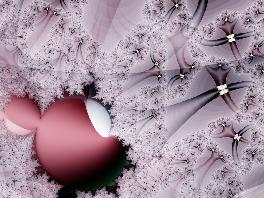
My favorite newsgroup for collecting slide-show images has to be alt.binaries.pictures.fractals. Nothing seems as refreshing on a computer screen as a sequence of beautiful fractals. If you've never seen a fractal, check out the fractal images that accompany this article. The images I'm using to illustrate this article are fresh from the alt.binaries.pictures.fractals newsgroup.
My wife, Nancy, and I love to travel, and one source of great travel shots is alt.binaries.pictures.scenic. I revisited this newsgroup last week and was amazed at the quality of many of the pictures.
Use these two groups for starters and look around for other topic areas. You'll find railroad photos, pictures of cars and a lot more.
If you don't want to use a newsgroup file sweeper, you can still do this the old fashioned way -- by going to a newsgroup using a standard newsreader and looking at the images one by one.
Don't waste your time using a newsreader that won't automatically display attached images. Most of the time I use Netscape Messenger to read newsgroups. All I do is click on a message and Netscape Messenger automatically extracts the image and displays it. (I do this under Linux, but the Windows and Macintosh versions work the same way.) I can then right click on an image to save it.