HOME
TOPICS
ABOUT ME
Even though Adobe rules the image-processing roost with Photoshop and its junior cousin, the company seems clueless when designing methods of clever image resizing. The Extensis plugin gets around this deficiency nicely.
Al Fasoldt's reviews and commentaries, continuously available online since 1983
T e c h n o f i l e
State-of-the-art image-resizing software for Windows and
Mac OS X
May 25, 2003
By Al Fasoldt
Copyright © 2003, Al Fasoldt
Copyright © 2003, The Post-Standard
Some digital photos are simply too small. They might look fine when you make wallet-size prints, but they probably look like they were shot through a pair of window screens when you make them larger.
The problem has to do with pixels, the picture elements that make up all digital images. You only have so many to go around when you resize a digital image the old-fashioned way. All you're doing is making the same number of pixels bigger, and that can get ugly fast.
"Smart" resizing is another matter. Software that knows what pixels are all about can fill in the gaps, creating new pixels in the spaces left over when the image expanded.
To be smart, image-enlarging methods need to be more than just clever. They need to have a smidgeon of artificial intelligence, too. They have to be able to add the right kind of pixels in the right places, matching colors and light-to-dark shadings in the process.
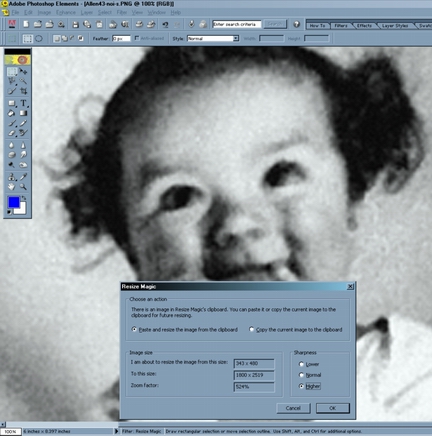
Resize Magic at work on a photo of the author as a toddler. The picture was a low-resolution scan. Resize Magic turned it into an image that could be printed 4 by 6 inches or even 8 by 10 inches.
Until now, only a few programs could do this well enough to fool my eyes. The reigning champ was Photo-Brush, a Windows image editor that costs only $38 (www.mediachance.com). Nothing ranked high enough on the Macintosh side to warrant any praise.
Even worse, the software most professionals use for image editing and manipulation, Adobe Photoshop, did a terrible job of image resizing. (Hint to the pro users out there: Photoshop STILL does a terrible job. Pay attention to the advice in this article. You'll be far ahead of other Photoshop professionals.)
But the long drought is over. Two new image-resizing programs are now available. They're each Photoshop plugins. If you're not a Photoshop user, don't fret: Photoshop plugins work with other programs, too, including my favorite consumer image editor, Adobe Photoshop Elements 2.0.
The first is a plugin you can buy right now. It's Resize Magic, a $30 plugin from FSoft, a software company in Torino, Italy (www.fsoft.it/imaging/en/default.htm). You can try Resize Magic without cost for as long as you like, but the free version leaves gaps in every image it processes.
Resize Magic is much too easy to use. If you buy the plugin, don't look for hidden options. The only options that affect image quality are related to sharpness, and they're easy to play with. (You'll find, for example, that setting sharpness to the highest level might not improve an image that has a lot of noise, so don't assume that more sharpness is always better.)
Resize Magic is a Windows plugin. A Mac version is being considered but is not a certainty.
But users of modern Macs with the OS X operating system -- it's standard on every new Macintosh computer -- have an even better plugin for resizing. It's not yet available officially, but should be ready in a month or so.
It's Extensis pxl SmartScale. I've been testing a beta version on my Apple G4 Macintosh, so I can't tell you what it will cost when it's released. If the price is less than $100, pxl SmartScale could well be the most important plugin a professional could own, and it could be almost essential for semi-pro users and serious amateur photographers alike.
The catchy spelling serves as a hint that pxl SmartScale is no ordinary resizing program. It's more complicated than Resize Magic but still easy enough to master in a couple of tries. I was very impressed with the options, too; left to its defaults, pxl SmartScale does a great job, but optional image smoothing and edge enhancement turn this plugin into a digital delight.
Best of all, pxl SmartScale integrates so well into Photoshop and Photoshop Elements that it can serve as an ideal substitute for the inferior way those two programs resize images.
Even though Adobe rules the image-processing roost with Photoshop and its junior cousin, the company seems clueless when designing methods of clever image resizing. The Extensis plugin gets around this deficiency nicely.
I'll let everyone know when the Extensis plugin is released. If you can't wait, you might be able to find out more about it beforehand at the company's beta site, http://beta.extensis.com.